Suggestions

If you are looking for information on anything specific and cannot find it here, please leave a comment and I will sort out the information for you and post it at the earliest convenience.
Showing posts with label Facebook. Show all posts

Tuesday, 9 September 2014

7 Tips to Create Facebook Ads That Convert

Are you already advertising on Facebook – but not yet seeing the results you hoped for? If you want your ad spending to yield more fans, leads or sales, you might just need to tweak your strategy a little bit to start seeing a better return on investment.

Here are 7 of my favorite Facebook ad tips for tweaking your approach, so your next Facebook ad results in higher conversion rates – and more business for you.

#1 Reach More Fans Through the News Feed

The number of users accessing Facebook on mobile devices has skyrocketed in the past year – today, 60 percent of all users are visiting Facebook on their phones and tablets. This has pretty serious implications for advertisers because when users access Facebook via mobile, there is no right-hand column – which means you can’t afford not to focus at least some of your advertising on News Feed placements.
And there’s data to back that up – according to a study by SocialCode, Facebook mobile ads earn up to 2.5 times more than desktop-only ads.
To get your Facebook ads into the News Feed (specifically Page Post ads, Page Like ads and Sponsored Stories), you have to use the Power Editor. It’s different (and a little more complicated) than the ads dashboard you’re used to, but there are plenty of resources to help you learn how.
The best way to get started is by using the free Power Editor Chrome plugin.  (How to set it up: Open Chrome, install the Power Editor, and access it here. Select “all” accounts when prompted so you can access your past ads too. Facebook has created a guide to using it.) But the main feature you’ll want to pay attention to is the “Placements” feature, which enables you to take any ad (like a Page Post Ad – my favorite) and select whether you want it to go to your users’ Desktop News Feeds, Mobile-Only News Feeds, or both. When you choose one or both of these options, your ad will ONLY be seen in the News Feed and not in the right-column.
I always choose both “Desktop News Feed and Mobile-Only News Feed” to get maximum exposure in the News Feed. Why do I not choose the right-hand column as well? Since making this shift to News Feed only ads, I’ve gone from about 0.1% Click Through Rate to between 4%-7%! To put it simply, ads in the News Feed get much more engagement than ads in the right-hand column on Facebook.
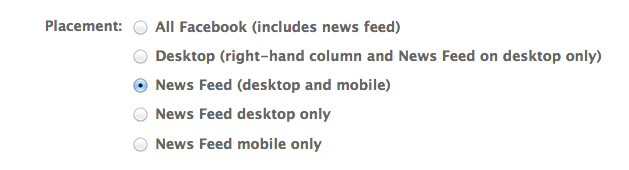
The main feature you want to pay attention to in the Power Editor is the Placement  feature, which enables you to take any ad for a Facebook Page, like a Sponsored Stories or Page Post Ad, and select whether you want your ad to go to your users’ desktop News Feeds, mobile-only News Feeds, or both. I always choose both for maximum exposure.
The main feature you want to pay attention to in the Power Editor is the Placement feature, which enables you to take any ad for a Facebook Page, like a Sponsored Stories or Page Post Ad, and select whether you want your ad to go to your users’ desktop News Feeds, mobile-only News Feeds, or both. I always choose both for maximum exposure.

#2 Jump-Start Your Lead Generation With Facebook Offers

One of my favorite things to do is to create Offers for my fans and non-fans in order to build out my email list. Offers used to be something only available to businesses with a brick-and-mortar location, and worked a lot like emailed coupons – but now any kind of business can use them.
Rather than create an Offer to sell a big product – say, a $1,500 coaching package – what I recommend is using an Offer to promote a FREE giveaway in exchange for users’ email addresses. After all, Offers get emailed right to your users – and their inbox is where YOU want to be!
So set up a simple landing page for your giveaway that requires an email and a name, and then create an Offer (with an enticing thumbnail) that links up to the landing page. Next, turn it into a Promoted Post directly via your Page wall (or, for more targeting options, go into the ads dashboard instead). You can also try targeting non-fans – or even fans of your competitors – if the Offer is juicy enough. (But see tip #7 first.)
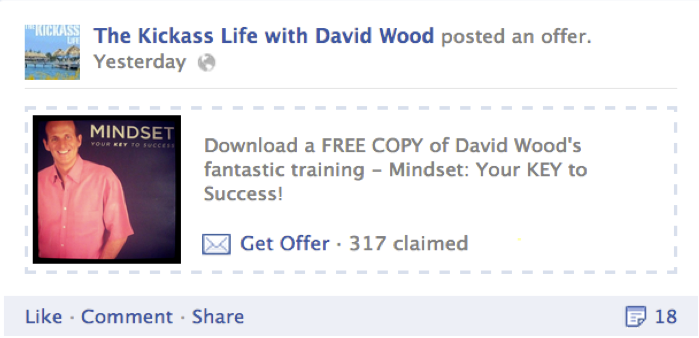
The best use of Facebook Offers is to create list-building opportunities like this example here from The Kickass Life Facebook Page.

If you want to try and drive sales vs. leads, try promoting the post to current fans (pin it to the top of your Wall for an extra push) and offering a specific dollar discount or free option, like this one:
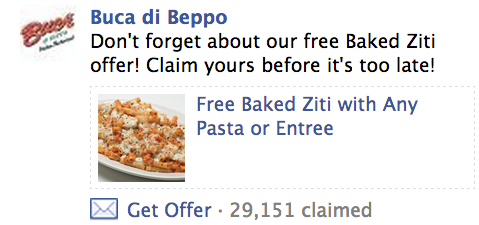
When using Facebook Offers for direct sales, such as those that promote a discount or coupon, first experiment by only posting it to your current fans.  If it's well received, then test it with a targeted non-fan segment.
When using Facebook Offers for direct sales, such as those that promote a discount or coupon, first experiment by only posting it to your current fans. If it’s well received, then test it with a targeted non-fan segment.

#3 Super-Charge Your Sales With “Custom Audiences”

 Sometimes, the conversion goal for an advertising campaign is simple: sell more.
In that case, it makes the most sense to target people who are already leads – like your email list. In the past, though, there was no convenient way to sync up your email list with your Facebook marketing.
That has since changed with the addition of the “custom audiences” feature – now you can upload your email list directly to Facebook, so that when you set up an ad, you can select them as a “custom audience” in the targeting section of the ads dashboard. Advertisers are already reporting a higher conversion rate on their ad spends (in one example cited by Facebook, an auto company saw a 24x return on their ads by using custom audiences in combination with Offers).

 #4 Save on CPC With Hyper-Targeted Advertising

If you focus most of your early marketing efforts on building a solid Facebook fan base – 5,000+ fans – you will start to see MUCH higher conversion rates right off the bat when you target fans-only in your ad campaigns. But you do need that core, solid fan base first so you have some critical mass to actually sell products or services.
How much savings can you expect? Well, as a result of targeting some of my key ads to only my own fans, I’ve paid as little as $0.07 a click – and seen FAR better conversions and sales as a result.
When you work hard to build a fan base first, you reap the rewards by getting better ad conversions…without breaking the bank!
As important as advertising is, your ability to create a thriving community – and engage them often – is the real secret sauce to getting better and better returns on your ad spending. For more tips on Facebook engagement, click here.

#5 Play by the 20-Percent Rule

Facebook recently revised their guidelines for Facebook ads that appear in the News Feed, like Promoted Posts, Offers and ads that you target to mobile Facebook users. Any image-based ad that goes out to the News Feed of users – like a still from a video advertising your next webinar, for example, or a product image offering a discount – can have a text overlay, but that text can’t take up more than 20 percent of the total ad image.
Make sure your image-based ads don’t get penalized before they get results!

What NOT to Do:
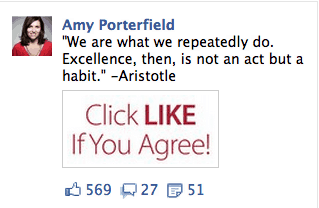
This ad will not be approved for placement in the News Feed because the ad image is more than 20% text. Instead, use ad images that are mostly graphic with minimal text.

Try This Instead:
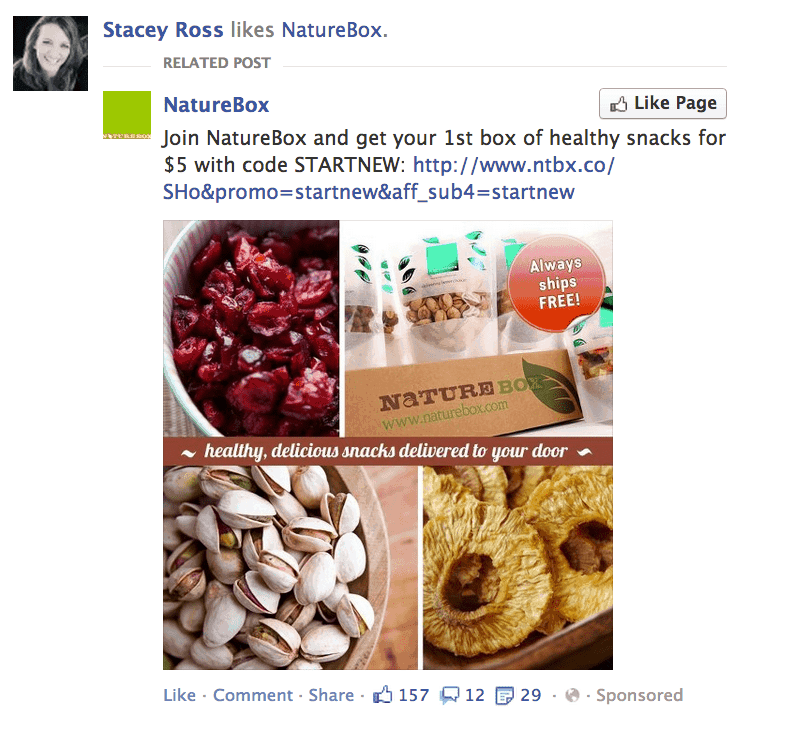
This ad image in this Page Post Ad is a great example an image with less than 20% text.  This ad would be approved for the News Feed.
This ad image in this Page Post Ad is a great example an image with less than 20% text. This ad would be approved for the News Feed.

#6 Get More Fans With the New “Like” Ads

To my point in tip #4, all businesses need a community first. Your ability to actual turn Facebook fans into leads and finally, paying customers is key to your business success — to the extent that you can keep those numbers engaged and genuinely interested, of course!
Which is where the new “Like Ads” come into play. These are designed mainly to help you grow your total number of fans, and are useful to anyone in the early stages of community building (or whenever you’re ready to grow your existing community). Unlike most ads, these “Like Ads” do well when they appear in the right-hand column, so I would not limit them just to the News Feed.
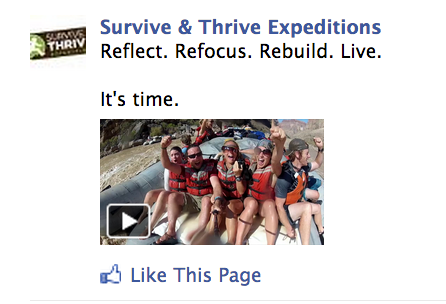
When non-fans see your Page Post Ad in the right-hand column on Facebook, they will have an opportunity to LIKE your Page directly from the ad.

To get new people interested and engaging with your brand, it’s important to establish trust and affinity up front. I know I talk about the power of video often, but this is one spot where you really want to think about leveraging video. It’s personal and it builds instant trust more than any product image, promotion or deal ever could. Keep it short, tease with one clear benefit and always include a call to action!

#7 Get Smarter With Promoted Posts

Promoting posts is a great way to get more eyeballs on your status updates. Whether your goal is engagement (maybe you asked a fun question you want fans to weigh in on), conversions (like driving fans to sign up for a free webinar in exchange for an email address) or sales, the fact is, Promoted Posts work best with one audience: yours. Your fans already know you, trust you, and want to engage with you.
A Promoted Post – and specifically, the “Sponsored Story” that gets automatically created with it – looks  a lot like spam to a user who has never liked your Page or interacted with your brand before. What would you do if you saw this in your feed and you’d never heard of the brand advertising it?
Between you and me, we’ve all seen these and thought they were tacky. But there’s a real danger that a user might complain that your Promoted Post is spam. So my best tip is toonly target fans with Promoted Posts. They are the most likely to engage and convert anyway, so why widen the net? And take that extra step to delete the Sponsored Story that gets automatically created (here’s how) too, to be extra safe. Just because some advertisers take advantage of Facebook doesn’t mean you should.

Wednesday, 6 August 2014

Make Money using Facebook and Twitter

Do you enjoy using Facebook and Twitter?


Why not make money doing what you enjoy?


Learn the WEIRD trick that allowed this single Mother to climb out of debt and make over $700 per week helping businesses with their Facebook and Twitter accounts!


It is part of most people's everyday lives - you chat to your friends and you interact with people who also enjoy Facebook and Twitter.

So why not earn money while you do it?


If You Find It Hard To Believe, Check Out This Fox News Video Report On Social Media Managers


I’ll show you how to find hundreds of easy social media jobs that you can begin right away!


Plus I’ll show you how you can get businesses to give you their products for FREE to test as part of your social media manager duties!

Many businesses will send you free samples of their products and services as part of the job, to ensure that you know enough about their business. I’ll show you the secrets I’ve learnt to keep all of these products for free!

Here are some of the free items I’ve received in the past month!
- Sat Nav
- Tablet computer
- HD Camera
- Sunglasses
- Lots of smaller household products
And this was just last month!
Get Started Today


Wednesday, 23 July 2014

Facebook Acquires Video Advertising Start-Up LiveRail

They Know What Users Want, Now To Sell It To Them

Facebook has acquired LiveRail, a start-up which develops ways for companies to focus video ads on their sites more directly to consumers. As the largest platform for the publishing of video adverts across a variety of sites, delivering over seven billion targeted video ads every month, the purchase of LiveRail marks a definitive move on Facebook’s part to further monetise the growing capacity of mobile devices in particular to integrate video into users’ News Feeds.

liverail facebook
Source: mashable.com
The social networking site first trialled auto-playing ads at the end of 2013, and auto-playing videos were introduced into all users’ News Feeds in March of this year. This acquisition demonstrates Facebook’s commitment to this movement, and can be seen as a challenge to the growing threat of Twitter and that company’s long-term integration of corporately sponsored Tweets into users’ feeds. It also shows the impact which mobile browsing has had on the company’s business model; Snapchat’s recent introduction of sponsored Snaps suggests that Facebook is not alone in seeing video advertising as a significant aspect of the future of monetised mobile social media.

LiveRail’s reported purchase price of up to £291 million reinforces Facebook’s perceived commitment to targeted advertising as a large part of the company’s revenue stream. Targeted is the key word here; while the traditional models of advertising have prized volume above all else, LiveRail’s expertise in tailoring adverts to specific demographics and even to individual users is another indicator of the paradigm shift which mass engagement with social media has brought about.

Just as Tumblr have been careful not to disrupt or alienate existing users as they introduce advertising to their site by attempting to ensure that people only see ads which are of genuine interest, so too do Facebook hope to create an environment in which suggested content is almost indistinguishable from user-selected content.

Currently Facebook tracks the browsing history of users even outside of Facebook – a person searching for flights to Venice, for example, may then see ads on their Feed for hotels and restaurants in Venice. This extensive data mining, combined with the technology for tailored ads which LiveRail will bring, should attract advertisers who may previously have been concerned that their products were too specific to be worth dropping into the maelstrom of Facebook’s 1.11 billion monthly users.

liverail facebook
Source: sify.com
This is not only a move to ensure direct profits. Next week Facebook will release its quarterly earnings, and with their share price still not as robust as some may have hoped by this stage their purchase of LiveRail could be seen as a move to reassure investors that the company is still focused on growing a more diverse array of revenue streams. Alongside their introduction of promoted posts earlier this year and their trialling of a ‘Buy’ button on businesses’ pages from last week, this latest move should suggest to shareholders that the company is at least open to experimenting with methods of monetising which consist of more than simply a string of ads down the right side of the page which are ignored more often than not.

View Source Here

Wednesday, 16 July 2014

Facebook Gives Out Free Wi-Fi

Critics are keen to knock Facebook – on ethical and financial terms, as well as pointing to clear decreases in organic reach – but it seems that Zuckerberg’s global vision isn’t in too much trouble just yet.
  

Facebook global internet

Facebook is moving ahead with its master plan to get the entire world online. Having co-launchedInternet.org a year ago, alongside technology giants Ericsson, Nokia, Samsung, MediaTek, Opera and Qualcomm, the group aims to efficiently use data in order to make Internet access affordable to all businesses and people across the world.

The project’s homepage states that: ‘Internet.org is a global partnership between technology leaders, nonprofits, local communities and experts who are working together to bring the Internet to the two thirds of the world’s population that doesn’t have it’ – a genuine humanitarian mission, or does it hint at slightly more devious aims?
  

Facebook global internet
Source: rocketfishltd.co.uk
Yesterday, Facebook announced a pilot program that aims to provide free wireless Internet to students in the Rutherford County School District in Forest City, North Carolina— the same city that houses one of the company's massive data centers.  

It's the first time that Facebook has provided free Wi-Fi to students, and could be the first of many such partnerships to come if the program is successful.

The initiative builds on a previous partnership that saw 6000 school students receive a free laptop, courtesy of the social networking site, however half of these didn’t have wireless Internet at home – once again,Facebook has stepped in to save the day.

Offering free Wi-Fi to students may also help Facebook stay connected to the teen demographic it's been accused of losing. Those using Wi-Fi provided by Facebook won't be directed to a Facebook landing page, but if a teenager knows his wireless is a gift from Facebook, perhaps he'll be more inclined to use the service.

Although not on the same global scale as Internet.org, the essential theme remains the same – for whatever reasons, altruistic or otherwise, Facebook wants everyone online.


View Source Here

Tuesday, 15 July 2014

11 Cool Things You Can Learn About Facebook Marketing From A 20 Year Old CEO

If you know me then you will know I love Facebook marketing. This March I attended Social Media Marketing World in San Diego and while I was there I met Alex Houg, the twenty year old CEO ofBlitzMetrics. I have been watching Alex’s journey from afar over the past number of months and wondered, what could this young CEO teach me about Facebook marketing?

Alex Houg Quote6

Some Background

At 14, Alex was an internet marketing entrepreneur with his own online gaming accessory website which he later sold. Today he leads a team of 22 people at BlitzMetrics, helping small business owners drive leads and sales via Facebook.
His focus with BlitzMetrics is the QuickStart program, fully implementing and tuning Facebook ads with packages available for all levels of business. His other projects include The Untern Movement- A program designed to help college students discover what they love and gain valuable job experience in cooperation with universities. With this program, his goal is to provide participants with a certification program built around what they enjoy, free of charge.
Alex strives to help others around him succeed, empowering people to do what they are passionate about.
I took on the task of reading Alex’s blog to find out what I could learn about Facebook marketing. Some of the points are news related but I have extracted so much value and I hope you will too.

#1. Facebook Knows What You Did Last Night!

Yes and again if you know me I’m not afraid to share my most recent meal on Facebook and neither are the guys at BlitzMetrics. If you don’t have Graph Search yet you can access it by changing your language on Facebook to US and it should appear.
You may not be utilizing Graph search yet and if not you need to get on it. By running some simple searches you can find out more about your target audience. As the feature develops, Alex tells us that Facebook will make recommendations to users based on their interests! This may be powerful for you as a brand. Try these and see what results you get:
  • Interests of people who like your brand
  • Interests of people who like your competition
  • Places liked by people who like my page
I could write a huge list, but this blog post is long enough. You see the idea is that you can also start to create the kind of content that interests your fans.
I had fun doing this search for photos of people who like Tweak Your Biz – and I spot some of my favourite people in there!
Graph Search

What you need to do now: Carry out some of these searches. Take a screenshot and use them in a post to thank your fans and customers. I do think it’s better to target people who already know you, but this exercise is a good way of finding out what your fans are into.

#2. Clever Ways to Impress Friends and Clients on Facebook

Of all the posts I read on Alex’s blog this one was my favorite. Being truly social means you need to listen and when you listen you pick up all sorts of information about the person you are meeting with. Now imagine you choose something relevant from that conversation and you send your client/friend a gift based on what they are passionate about. Check this out:
lego
What you need to do now: Social Media is great and making connections is what it’s all about, but there’s nothing quite like making an impact with a customer. If they are really social they are likely to share your random act of kindness  and this will give you some great visibility with their network, but remember it truly is better to give than receive.

#3. Keep Your Friends Close, Have Fun, Be Timely, Relevant and Helpful

Social Media is a powerful force that is evolving every day. One thing you can learn by following Alex is that there is no right or wrong answer. Social has to be at the heart of your content strategy and delivers what your customers need.  If you are truly social your brand will build meaningful relationships with the right people who will either become your customers or it will strengthen the relationship you already have with customers. We are all learning  and marketing on Facebook presents constant challenges but it’s really important to keep your friends close, have fun with what you do and deliver timely, relevant and helpful content.
friends
What you need to do now: To be successful you need to be passionate about what you do and how you help. Alex certainly does this well.

#4. Will the New RHS Ads on Facebook increase Ad CTR by 300%

Facebook has re-designed the newsfeed, pages and to enhance the change the RHS ad looks different. Will this affect your ads CTR? Probably not if your using oCPM because Facebook balance placement but the net affect will be an increased average CTR and you should see an improvement in campaigns. The new re-design will save you some time now because you can use the same creative as you would for newsfeed.
NRHS

#5. Facebook Marketing Does not Work for B2B

This is a common complaint that I hear from B2B marketers, but as Alex points out the targeting options on Facebook are now more advanced. Not only can you target a workplace, but you can target people by job title, industry, office type and workplace. Are you looking to influence the influencers? Here’s your opportunity. Take your already performing ads and duplicate them with these categories.
blitz
Here’s a great example from Blitzmetrics. Alex and his team co-presented with Marketo, then they posted the content to their blog and targeted people who work at Marketo.
What you need to do now: If you go to a big event and want to impress the influencers, write a great post and target them in your ad using these options.

#6. Should You Use Mobile Apps on Facebook?

This is a question people regularly ask. If you are a large brand with a development team and budgets apps add great value. Small business owners can use a number of solutions also. Using apps should only be used if they are central to your marketing strategy and to get the most from them you will need to amplify them with ads.  Alex advises that you should always focus on creating great content that adds value to your fans.
Here are some great companies that can provide you with all you need.
What you need to do now: Keep creating great content and adding value to your fans. Apps are really useful for list building and engaging fans but always think about your goal.

#7. Sadness for Facebook Admins as “Always On” feature is turned off

Yes, it was a sad day for me too when this feature was turned off and to be honest a real pain. Running an ad that automatically updated with every post was a real time saver. The good news is you don’t have to deal with the barrage of disapproved ads because images broke the 20% rule and when you used Facebook in your text. In addition the Boost Post (yes I just used that word and we will get to that subject later) has been revamped with smarter targeting options.
sadness
What you need to do now: Create some time every week to promote posts individually!

#8. Is it Really Possible to Get 100% CTR on ads?

How happy would you be to see that in an ad report? Alex says it is possible but only if you use super target audiences. It’s not uncommon to get a CTR of 20%-40% but how can this be when most people are lucky to get 1%. How you do this is target the people who have already bought from you and use custom audiences. This way your CTR will increase and your cost per conversion will decrease.
What you need to do now: Get your customer list and upload it to Facebook. People who already know you, like you and trust you will buy from you.

#9. Facebook Ad Groups/Sets: How to Get the Best from them

More changes to the way Facebook ads look and feel. Personally I like this change. Now each of your ads live in their own set. Budgeting and end dates are at the ad group level, so now there is no need to create a new campaign for every post. Campaigns are still by objective so audience-engagement-conversion framework still applies.
Existing
What you need to do now: To get the best from ad sets test out a number of creatives to see which perform the best.

#10. Are Boosted Posts a Waste of Your Ads Budget?

Alex entitled his post $88 to reach 360 people? What you need to know about boosted posts is that Facebook’s estimator is not accurate when you add additional budget to your boosted post. Alex saysWe’ve been able to get a reach of 50,000 on this very post for only $72.  So it’s unlikely that it would jump to $240″The takeaway here is that you can still get results if you have great content and your targeting is spot on.
What you need to know: If you don’t have time or your budget is small and you need to promote something in a hurry boosted posts can work. Be warned though your targeting must be relevant and you need to have rock solid content that you know works for your target audience.

#11. Do Boosted Posts Really Work?

This leads on from the last point and really I’m pointing out boosted post because many smaller local businesses with limited targeting options use this feature. The other challenge is a lack of time and budget to do anything more advanced. Here are some reasons that you may want to boost a post
  • Increase engagement but not conversion
  • Select interests as oppose to fans and friends of fans
  • If you have a highly shareable product for which you have reviews
  • If your content is excellent and that is evidenced by people liking it
The team at Blitz Metrics boosted a post for $15 which got 28 interactions and 20 clicks to their website.
What you need to do now: I saw this great comment on Alex’s blog from Benjamin Harries:
“Find the product that people like, create a post to promote it, target the right people based on their interests and keep satisfying customer demand” Don’t forget it’s not about finding loopholes it’s about knowing what your customer wants.
“The training BlitzMetrics puts on is completely free to students-even the travel and lodging. The businesses we have as clients subsidize these efforts, whether it is the NBA, Infusionsoft, Marketo, Jack Daniels, and other brands.  This gives students hands-on experience. Non-students must pay for training, which we conduct online and in our offices in Minneapolis”
To re-cap on this post and as a reminder, Alex Houg is a twenty year old CEO,  he knows much about marketing on Facebook and if you want to stay ahead of the curve keep an eye on his blog.

Wednesday, 9 July 2014

How to Retarget Content to Facebook Custom Audiences

Have you considered using Facebook to reach your existing customers or those who visit your website?
Have you tried Facebook’s custom audience options?
Retargeting to the right audience is a must if you want to see more conversions from your Facebook ads.
In this article you’ll discover four Facebook custom audiences you can create to retarget your content to the most relevant Facebook audience.
retarget your content
Retarget content to a your audience with Facebook Custom Audiences.

Why Retargeted Content?

The goal of retargeted content (also known as remarketing) is to place your brand top of mind. Common strategies remarket to people who have already visited your website.
sponsored facebook update from plated
Updates like this can show up in your news feed if you’ve ever visited the Plated website.
People rarely buy from you the first time they visit your site or see an offer. They would rather take their time, compare your pricing with competitors’ and visit your site a few more times before completing that valuable sale.
Here are four custom audiences you can use to retarget Facebook users with your content.

#1: Website Visitors

The most common remarketing tactic is targeting relevant ads at people who have already visited your website (usually a specific landing page).
To create a targeted audience based on website visitors, you must have a Facebook website custom audience in place.
Overall, retargeting website visitors is a simple concept: When someone visits a page with your custom audience code (i.e., an offsite pixel), they’re added to your custom audience list in your Facebook Ads Manager.
You can include those visitors (and the custom audience they’re part of) as a target audience in a Facebook ad retargeting campaign.
choosing an audience for ad targeting
Custom audiences are important to Facebook retargeting campaigns.
There may be a case where you want to retarget only a portion of the traffic that has visited a landing page on your website. No problem. You can do that by creating a personalized custom audience:
1. Go to your Facebook Ads Manager and choose Audience.
2. Click on Create a Custom Audience.
3. Under Website Traffic, select People Visiting Specific Pages.
3. Next to the Visited field, customize the URL elements to match the pages you want to retarget.
4. Click on Create.
website visitor custom audience set up
You don’t have to retarget everyone who visits your website.
After you create your personalized custom audience, it’s ready to use. However, keep in mind that it may take a few hours for the new audience to have the final user count.

#2: Facebook Fans

Retargeting to existing Facebook fans is incredibly easy: When you set up your Facebook ad, choose to target people who are already fans of your page.
facebook fan targeting
Narrow your retargeting audience to include only people who are fans of your page.
Does it seem odd to advertise to existing Facebook fans? Consider that acquiring sales from existing customers is cheaper than acquiring new leads (and many of your fans are probably customers). You can also upsell those existing customers with new or better products and services.
Additionally, your fans may not be seeing all of your Facebook updates. If youretarget your most important content to them via a Facebook ad, they’re more likely to see it.

#3: Email Subscribers

You can actually strengthen the power of your newsletter by serving Facebook ads to existing email subscribers.
To set up this custom audience, you need an Excel file with a column that includes all of your subscriber email addresses. Once you have that, go to Audiences in your Facebook Ads Managerclick Create Audience and choose Custom Audience.
Click on Data File Custom Audience and follow the instructions for the setup. Make sure to indicate that you’re updating email addresses.
facebook fan targeting
Create a custom audience based on your email subscriber list.
Retargeting to email subscribers can increase the chance of conversion exponentially. It’s worth the extra effort to set it all up.

#4: Similar Audiences

Many of your users—whether website visitors, Facebook fans or list subscribers—have overlapping demographics, interests and behaviors. Wouldn’t it be great to find more people like them? Well, you can.
You can create a custom audience targeting people who share similar characteristics to your existing connections—people who are very likely to be interested in your products, services and content.
The custom audiences you create to retarget to by similarity are called lookalike audiences and they expose your ads to a more vast and relevant audience.
To create a custom audience based on similarities to website visitorsgo to the Audience section of your Ads Manager and choose the custom audience installed on your website (see #1). Click Create Lookalike Audience at the bottom of the page and choose the desired audience reach.
To create a custom audience based similarities to your current Facebook fans’ personal data (e.g., behavior, interests, etc.), go to the Audience section of your Ads Manager, click Create Audience and choose Lookalike Audience from the menu.
create audience dropdown menu
Create a lookalike target audience to find potential Facebook fans and customers.
Click Source and type your page name. Select the country you want to target and how similar your audience should to be to your current fans. Click Create Audience.
creating a lookalike audience
Choose the characteristics of your fan page lookalike target audience.
To create a custom audience based on similarity to your current email subscribers, go to your Audience menu, click on the name of the email list you loaded in #3 and click on Create Lookalike Audience at the bottom of the page.
Once you have your custom lookalike audiences in place, you can select each as needed depending on the goal of your Facebook ads.
Wrapping Up
Retargeting via Facebook ads helps you stay top of mind while they’re considering their decision.
The trick is to retarget content to a precise audience rather than a generalized audience that may or may not be interested in learning more about your business, product or service.
Take advantage of Facebook’s extensive custom audience options to capture more conversions and meet your advertising goals.
What do you think? Have you retargeted content using Facebook custom audiences? Did you see more conversions? Leave your comments and questions below.

Have you considered using Facebook to reach your existing customers or those who visit your website?
Have you tried Facebook’s custom audience options?
Retargeting to the right audience is a must if you want to see more conversions from your Facebook ads.
In this article you’ll discover four Facebook custom audiences you can create to retarget your content to the most relevant Facebook audience.
retarget your content
Retarget content to a your audience with Facebook Custom Audiences.

Why Retargeted Content?

The goal of retargeted content (also known as remarketing) is to place your brand top of mind. Common strategies remarket to people who have already visited your website.
sponsored facebook update from plated
Updates like this can show up in your news feed if you’ve ever visited the Plated website.
People rarely buy from you the first time they visit your site or see an offer. They would rather take their time, compare your pricing with competitors’ and visit your site a few more times before completing that valuable sale.
Here are four custom audiences you can use to retarget Facebook users with your content.

#1: Website Visitors

The most common remarketing tactic is targeting relevant ads at people who have already visited your website (usually a specific landing page).
To create a targeted audience based on website visitors, you must have a Facebook website custom audience in place.
Overall, retargeting website visitors is a simple concept: When someone visits a page with your custom audience code (i.e., an offsite pixel), they’re added to your custom audience list in your Facebook Ads Manager.
You can include those visitors (and the custom audience they’re part of) as a target audience in a Facebook ad retargeting campaign.
choosing an audience for ad targeting
Custom audiences are important to Facebook retargeting campaigns.
There may be a case where you want to retarget only a portion of the traffic that has visited a landing page on your website. No problem. You can do that by creating a personalized custom audience:
1. Go to your Facebook Ads Manager and choose Audience.
2. Click on Create a Custom Audience.
3. Under Website Traffic, select People Visiting Specific Pages.
3. Next to the Visited field, customize the URL elements to match the pages you want to retarget.
4. Click on Create.
website visitor custom audience set up
You don’t have to retarget everyone who visits your website.
After you create your personalized custom audience, it’s ready to use. However, keep in mind that it may take a few hours for the new audience to have the final user count.

#2: Facebook Fans

Retargeting to existing Facebook fans is incredibly easy: When you set up your Facebook ad, choose to target people who are already fans of your page.
facebook fan targeting
Narrow your retargeting audience to include only people who are fans of your page.
Does it seem odd to advertise to existing Facebook fans? Consider that acquiring sales from existing customers is cheaper than acquiring new leads (and many of your fans are probably customers). You can also upsell those existing customers with new or better products and services.
Additionally, your fans may not be seeing all of your Facebook updates. If youretarget your most important content to them via a Facebook ad, they’re more likely to see it.

#3: Email Subscribers

You can actually strengthen the power of your newsletter by serving Facebook ads to existing email subscribers.
To set up this custom audience, you need an Excel file with a column that includes all of your subscriber email addresses. Once you have that, go to Audiences in your Facebook Ads Managerclick Create Audience and choose Custom Audience.
Click on Data File Custom Audience and follow the instructions for the setup. Make sure to indicate that you’re updating email addresses.
facebook fan targeting
Create a custom audience based on your email subscriber list.
Retargeting to email subscribers can increase the chance of conversion exponentially. It’s worth the extra effort to set it all up.

#4: Similar Audiences

Many of your users—whether website visitors, Facebook fans or list subscribers—have overlapping demographics, interests and behaviors. Wouldn’t it be great to find more people like them? Well, you can.
You can create a custom audience targeting people who share similar characteristics to your existing connections—people who are very likely to be interested in your products, services and content.
The custom audiences you create to retarget to by similarity are called lookalike audiences and they expose your ads to a more vast and relevant audience.
To create a custom audience based on similarities to website visitorsgo to the Audience section of your Ads Manager and choose the custom audience installed on your website (see #1). Click Create Lookalike Audience at the bottom of the page and choose the desired audience reach.
To create a custom audience based similarities to your current Facebook fans’ personal data (e.g., behavior, interests, etc.), go to the Audience section of your Ads Manager, click Create Audience and choose Lookalike Audience from the menu.
create audience dropdown menu
Create a lookalike target audience to find potential Facebook fans and customers.
Click Source and type your page name. Select the country you want to target and how similar your audience should to be to your current fans. Click Create Audience.
creating a lookalike audience
Choose the characteristics of your fan page lookalike target audience.
To create a custom audience based on similarity to your current email subscribers, go to your Audience menu, click on the name of the email list you loaded in #3 and click on Create Lookalike Audience at the bottom of the page.
Once you have your custom lookalike audiences in place, you can select each as needed depending on the goal of your Facebook ads.
Wrapping Up
Retargeting via Facebook ads helps you stay top of mind while they’re considering their decision.
The trick is to retarget content to a precise audience rather than a generalized audience that may or may not be interested in learning more about your business, product or service.
Take advantage of Facebook’s extensive custom audience options to capture more conversions and meet your advertising goals.
What do you think? Have you retargeted content using Facebook custom audiences? Did you see more conversions? Leave your comments and questions below.