Suggestions

If you are looking for information on anything specific and cannot find it here, please leave a comment and I will sort out the information for you and post it at the earliest convenience.
Showing posts with label Advertising. Show all posts

Tuesday, 9 September 2014

7 Tips to Create Facebook Ads That Convert

Are you already advertising on Facebook – but not yet seeing the results you hoped for? If you want your ad spending to yield more fans, leads or sales, you might just need to tweak your strategy a little bit to start seeing a better return on investment.

Here are 7 of my favorite Facebook ad tips for tweaking your approach, so your next Facebook ad results in higher conversion rates – and more business for you.

#1 Reach More Fans Through the News Feed

The number of users accessing Facebook on mobile devices has skyrocketed in the past year – today, 60 percent of all users are visiting Facebook on their phones and tablets. This has pretty serious implications for advertisers because when users access Facebook via mobile, there is no right-hand column – which means you can’t afford not to focus at least some of your advertising on News Feed placements.
And there’s data to back that up – according to a study by SocialCode, Facebook mobile ads earn up to 2.5 times more than desktop-only ads.
To get your Facebook ads into the News Feed (specifically Page Post ads, Page Like ads and Sponsored Stories), you have to use the Power Editor. It’s different (and a little more complicated) than the ads dashboard you’re used to, but there are plenty of resources to help you learn how.
The best way to get started is by using the free Power Editor Chrome plugin.  (How to set it up: Open Chrome, install the Power Editor, and access it here. Select “all” accounts when prompted so you can access your past ads too. Facebook has created a guide to using it.) But the main feature you’ll want to pay attention to is the “Placements” feature, which enables you to take any ad (like a Page Post Ad – my favorite) and select whether you want it to go to your users’ Desktop News Feeds, Mobile-Only News Feeds, or both. When you choose one or both of these options, your ad will ONLY be seen in the News Feed and not in the right-column.
I always choose both “Desktop News Feed and Mobile-Only News Feed” to get maximum exposure in the News Feed. Why do I not choose the right-hand column as well? Since making this shift to News Feed only ads, I’ve gone from about 0.1% Click Through Rate to between 4%-7%! To put it simply, ads in the News Feed get much more engagement than ads in the right-hand column on Facebook.
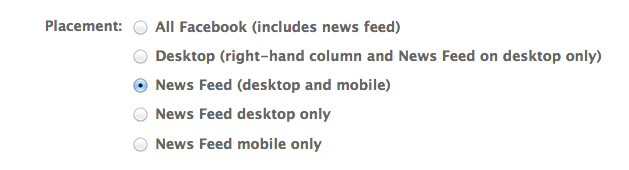
The main feature you want to pay attention to in the Power Editor is the Placement  feature, which enables you to take any ad for a Facebook Page, like a Sponsored Stories or Page Post Ad, and select whether you want your ad to go to your users’ desktop News Feeds, mobile-only News Feeds, or both. I always choose both for maximum exposure.
The main feature you want to pay attention to in the Power Editor is the Placement feature, which enables you to take any ad for a Facebook Page, like a Sponsored Stories or Page Post Ad, and select whether you want your ad to go to your users’ desktop News Feeds, mobile-only News Feeds, or both. I always choose both for maximum exposure.

#2 Jump-Start Your Lead Generation With Facebook Offers

One of my favorite things to do is to create Offers for my fans and non-fans in order to build out my email list. Offers used to be something only available to businesses with a brick-and-mortar location, and worked a lot like emailed coupons – but now any kind of business can use them.
Rather than create an Offer to sell a big product – say, a $1,500 coaching package – what I recommend is using an Offer to promote a FREE giveaway in exchange for users’ email addresses. After all, Offers get emailed right to your users – and their inbox is where YOU want to be!
So set up a simple landing page for your giveaway that requires an email and a name, and then create an Offer (with an enticing thumbnail) that links up to the landing page. Next, turn it into a Promoted Post directly via your Page wall (or, for more targeting options, go into the ads dashboard instead). You can also try targeting non-fans – or even fans of your competitors – if the Offer is juicy enough. (But see tip #7 first.)
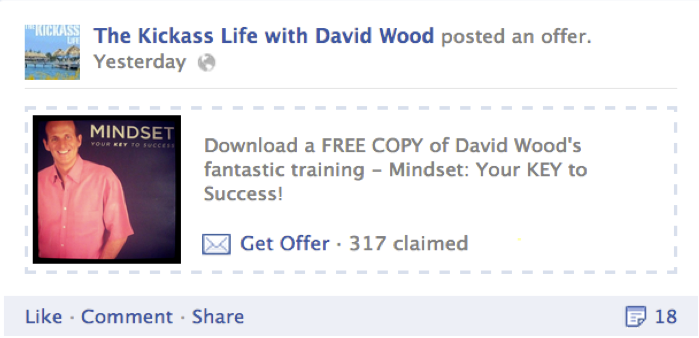
The best use of Facebook Offers is to create list-building opportunities like this example here from The Kickass Life Facebook Page.

If you want to try and drive sales vs. leads, try promoting the post to current fans (pin it to the top of your Wall for an extra push) and offering a specific dollar discount or free option, like this one:
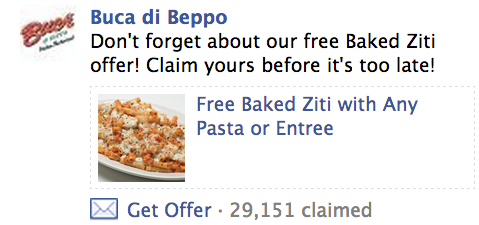
When using Facebook Offers for direct sales, such as those that promote a discount or coupon, first experiment by only posting it to your current fans.  If it's well received, then test it with a targeted non-fan segment.
When using Facebook Offers for direct sales, such as those that promote a discount or coupon, first experiment by only posting it to your current fans. If it’s well received, then test it with a targeted non-fan segment.

#3 Super-Charge Your Sales With “Custom Audiences”

 Sometimes, the conversion goal for an advertising campaign is simple: sell more.
In that case, it makes the most sense to target people who are already leads – like your email list. In the past, though, there was no convenient way to sync up your email list with your Facebook marketing.
That has since changed with the addition of the “custom audiences” feature – now you can upload your email list directly to Facebook, so that when you set up an ad, you can select them as a “custom audience” in the targeting section of the ads dashboard. Advertisers are already reporting a higher conversion rate on their ad spends (in one example cited by Facebook, an auto company saw a 24x return on their ads by using custom audiences in combination with Offers).

 #4 Save on CPC With Hyper-Targeted Advertising

If you focus most of your early marketing efforts on building a solid Facebook fan base – 5,000+ fans – you will start to see MUCH higher conversion rates right off the bat when you target fans-only in your ad campaigns. But you do need that core, solid fan base first so you have some critical mass to actually sell products or services.
How much savings can you expect? Well, as a result of targeting some of my key ads to only my own fans, I’ve paid as little as $0.07 a click – and seen FAR better conversions and sales as a result.
When you work hard to build a fan base first, you reap the rewards by getting better ad conversions…without breaking the bank!
As important as advertising is, your ability to create a thriving community – and engage them often – is the real secret sauce to getting better and better returns on your ad spending. For more tips on Facebook engagement, click here.

#5 Play by the 20-Percent Rule

Facebook recently revised their guidelines for Facebook ads that appear in the News Feed, like Promoted Posts, Offers and ads that you target to mobile Facebook users. Any image-based ad that goes out to the News Feed of users – like a still from a video advertising your next webinar, for example, or a product image offering a discount – can have a text overlay, but that text can’t take up more than 20 percent of the total ad image.
Make sure your image-based ads don’t get penalized before they get results!

What NOT to Do:
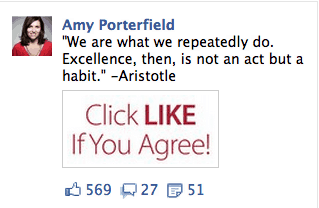
This ad will not be approved for placement in the News Feed because the ad image is more than 20% text. Instead, use ad images that are mostly graphic with minimal text.

Try This Instead:
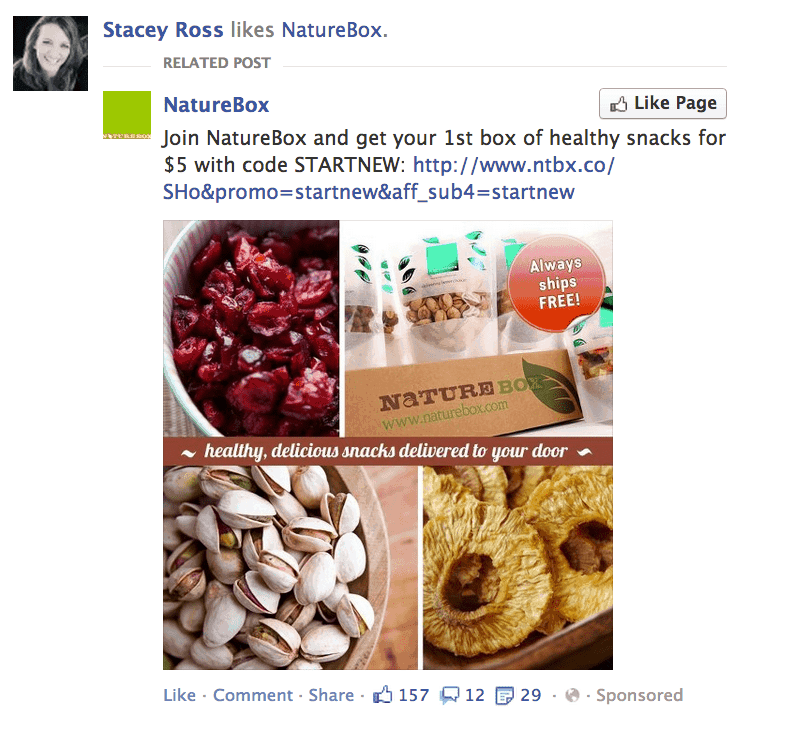
This ad image in this Page Post Ad is a great example an image with less than 20% text.  This ad would be approved for the News Feed.
This ad image in this Page Post Ad is a great example an image with less than 20% text. This ad would be approved for the News Feed.

#6 Get More Fans With the New “Like” Ads

To my point in tip #4, all businesses need a community first. Your ability to actual turn Facebook fans into leads and finally, paying customers is key to your business success — to the extent that you can keep those numbers engaged and genuinely interested, of course!
Which is where the new “Like Ads” come into play. These are designed mainly to help you grow your total number of fans, and are useful to anyone in the early stages of community building (or whenever you’re ready to grow your existing community). Unlike most ads, these “Like Ads” do well when they appear in the right-hand column, so I would not limit them just to the News Feed.
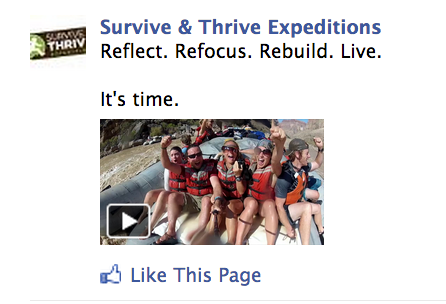
When non-fans see your Page Post Ad in the right-hand column on Facebook, they will have an opportunity to LIKE your Page directly from the ad.

To get new people interested and engaging with your brand, it’s important to establish trust and affinity up front. I know I talk about the power of video often, but this is one spot where you really want to think about leveraging video. It’s personal and it builds instant trust more than any product image, promotion or deal ever could. Keep it short, tease with one clear benefit and always include a call to action!

#7 Get Smarter With Promoted Posts

Promoting posts is a great way to get more eyeballs on your status updates. Whether your goal is engagement (maybe you asked a fun question you want fans to weigh in on), conversions (like driving fans to sign up for a free webinar in exchange for an email address) or sales, the fact is, Promoted Posts work best with one audience: yours. Your fans already know you, trust you, and want to engage with you.
A Promoted Post – and specifically, the “Sponsored Story” that gets automatically created with it – looks  a lot like spam to a user who has never liked your Page or interacted with your brand before. What would you do if you saw this in your feed and you’d never heard of the brand advertising it?
Between you and me, we’ve all seen these and thought they were tacky. But there’s a real danger that a user might complain that your Promoted Post is spam. So my best tip is toonly target fans with Promoted Posts. They are the most likely to engage and convert anyway, so why widen the net? And take that extra step to delete the Sponsored Story that gets automatically created (here’s how) too, to be extra safe. Just because some advertisers take advantage of Facebook doesn’t mean you should.

Sunday, 13 July 2014

A Quick Trick for Writing 1 Page for 2 Audiences

My first startup was a realtor rating site called What Customers Say. On the home page for What Customers Say, we had to speak to two groups: 1) realtors and 2) home buyers and sellers.
Naturally, the value + benefits associated with using the rating site were very different for realtors than for home buyers / sellers. But we knew we needed to speak to both groups because, well, we were a startup, and we were trying hard to grow both sides at the same time.
My second startup was Page 99 Test, a site where fiction readers rate one page of a book submitted by a novelist.
Once again, we had 2 groups to attract… and 2 groups to keep on the site. All with a single home page as an entry point. And with a single headline on that page.
Is it easy to speak to both groups? Um, no. When you’re actually faced with sitting down and writing the copy, you can only pray that someone walks in and gives you something else to do.
But even then – eventually – you have to get back to the task at hand.
Sometimes, you choose one audience and subordinate the other. That’s the easiest approach, from a copywriter’s perspective, and it’s what TutorSpree has opted to do. Even though they’re connecting 2 groups, the goal is clearly to focus on attracting students first, tutors second (see the tiny button in the top right corner):
TutorSpree
Other times, you don’t have the luxury of choosing 1 group over the other, which then begs the question…:

What Happens When You Need to Attract 2 Groups Equally… on the Same Page?

Here’s what I do. When I’m helping my startup clients with this issue, I ask them to create a Venn diagram in which the values X, Y and Z audience derive from your product are listed, and the similarities overlap.
Simple, right? Well it’s amazing how rarely people actually sit down and do this exercise, given the simplicity of doing it + the heartache it can eliminate.
Here’s an example of how it works. Let’s say you were to write the home page for Appbackr, which is a marketplace-style site offering a solution designed for both app developers and app sellers / retailers. You want to speak to both groups in the same headline… so here’s what your Venn diagram might look like:
Writing 1 home page for 2 audiences
With that Venn diagram complete – and you know it wouldn’t take you long to do – you can then craft a single home page headline that speaks to both audiences:
Where App Developers & App Sellers Make More Money & Generate More App Installs
Once your headline has brought both groups into the page, you have a few choices for displaying content to each group separately:
  1. Choose one group to target on the rest of your home page, and use a call to action to quickly drive the other group to a targeted landing page
  2. Write for both groups on the same page, but use section headers to help people identify the right message for their needs
  3. Write for both groups on the same page, but keep the page very short, driving each group to its own targeted landing page
Let’s check out what direction Appbackr takes. As you’ll see in the screenshot here, Appbackr first addresses both audiences in the headline… and then, below the PR mentions, employs the UX + messaging strategy from the third point above: they keep the page short and quickly drive each group to its own targeted landing page.
Appbackr 2 audiences 1 page
That’s it. Writing 1 page for 2 audiences is that simple. :) I mean, sure, there are always exceptions…
But if you look deep enough – or even high enough – you’ll see that there IS overlap between what your 2 audiences are looking for when they land on your site. And that overlap can be used to help you craft the right headline to reduce bounce… and increase the likelihood that your 2 audiences will actually read the more targeted messages you’ve got for ‘em elsewhere on your site.

Should You Use a Curiosity Gap to Persuade Your Visitors to Click?

The “curiosity gap” is a powerful copywriting technique…
It’s so powerful, in fact, that using it recently led to a 927% increase in clicks on a Pricing page.
But before I show you how we got those incredible results, let’s answer the obvious questions: what the hell is a curiosity gap? And how can you use it to a) keep visitors engaged and b) compel them to move forward?
I spoke about the curiosity gap at Microconf 2013
The curiosity gap is the space between what we know and what we want or even need to know.
Your prospects want to fill the information gap. Your job, as a copywriter or marketer, is to delay the filling of the gap for as long as you can – without introducing too much discomfort – in order to keep your visitors engaged… To keep them hanging on, really.

What Else Could Have Compelled Eve to Bite the Apple?

Curiosity is a driving force that’s often stronger than fear of loss and desire for economic gain.
Think Pandora’s Box. Think Eve. Think Lot’s wife turning back to look, even though she knewthe punishment was death. Think of every cliffhanger since Scheherazade‘s 1,001 nights. Think of those Upworthy headlines everybody whines about now (but which I continue to love). Hell, think of that damn storage locker slamming shut on Storage Wars just as something’s about to be revealed… and just as we go to commercial…
Not knowing everything yet is intriguing for people.
We need to connect dots.
We need to bridge gaps.
Which means that clever copy hackers can lure prospects into our sales copy – or deeper into our funnel – with a little dose of strategically placed curiosity.
For marketers, using the curiosity gap generally means:
  • Introducing something new that our existing knowledge or previous experiences can’t explain; similar to cognitive dissonance
  • Starting a story, pausing at a climactic moment, and delaying the conclusion of it
  • Withholding key information for a manageable period of time (but not too long, which can deflate curiosity)
  • Introducing an idea, action or concept… and connecting it with an unexpected outcome or subject
What does the curiosity gap look like? Well, thanks to Upworthy, we’ve seen a lot headlines that use it, like so:
Note: I stopped to watch all these videos - and more - while writing this post.
Note: I stopped to watch all these videos – and more – while writing this post.
But it’s not just good for headlines. The curiosity gap is a great tool to keep in your back pocket whenever you want anyone to a) read for a period of time – as on sales pages or in body copy – or b) watch your explainer video. It’s fantastic in emails, when you want to drive people to click to a landing page, and as subject lines, like these:
Curiosity gap in subject lines
Subject lines with curiosity
It’s also, as you’re about to see, a pretty compelling way to get people to take action…

The A/B Test:

Curiosity Brings in a 927% Lift in Clicks on a Plan,

with 100% Confidence

We recently ran an A/B/C test on the Pricing page for Mad Mimi, a very cool email marketing platform you should check out…
The test was supposed to be a simple pricing table test. We created 2 treatments:
  1. Variation 1 – Reorder the plans to lead with the most expensive and see if, in keeping with primacy effect, we increase clicks to sign-up for the more expensive plans: Silver and Pro.* Subordinate hyper-expensive Gold plan. Optimize button copy.
  2. Variation 2 – Optimize button copy.
Here’s the creative:
Curiosity test 1
Variation 1
Curiosity a/b test clicks
Variation 2
Primary goal: Decrease clicks to sign up for the low-priced Basic plan while increasing clicks on the higher-priced plans.
Secondary goal: Increase clicks to sign-up overall.
We haven’t reached a conclusion on the goal of increasing sign-ups for the Silver and Pro plans; in fact the test is still running for those goals…
…But we did see an incredible lift in clicks to sign up for the Gold Plan…
Curiosity A/B test lift
On Variation 1, Mad Mimi saw a lift of 927% in clicks to sign up for Gold. With 100% confidence. Variation 2 killed it on the other goals – like engagement and choosing Basic – but Variation 1 was a clear, untouchable winner for the Gold plan.
Now scroll back up to the Variation 1 screenshot and look for the Gold plan. That’ll show you why I’m mentioning this test in this post… See where Gold is listed on Variation 1? See what’s missing from it? You guessed it: the price.
In the absence of knowing the price for Gold, visitors clicked to find out. All those extra clicks on Variation 1′s Gold links were “curiosity clicks”…

So, Should You Use Curiosity to ‘Compel’ People to Click?

In the case of Mad Mimi, curiosity clicks didn’t lead to an increase in sign-ups for Gold plans. (That the Gold plan starts at $1049/mo might have something to do with the drop-off, though.) If Mad Mimi had a strategy to better position the price of the Gold plan on the landing page for that link, this curiosity gap could be quite good for business…
The question isn’t really whether you should use curiosity gaps or not. They’re powerful when done right and on-strategy.
The question we might want to ask first is this: Is clicking the best success metric?
Before you answer that, here’s a story: Back when I was at Intuit, the marketing team decided to challenge the creative team to prove our chops against an agency. (Oh, the joys of being in-house creative.) We were to write and design the emails for a boxed software solution – I think it was Quicken – and the group that created the winning email would be, like, crowned Most Awesome or something. So we went about our business. And when the test closed, the agency reigned supreme.
Why?
Because the success metric for the test was click-thrus. And while we’d oh-so-foolishly put the Quicken sale price in our email, the agency hadn’t, thus nearly doubling “curiosity clicks” to the landing page (i.e., to discover the sale price). Our paid conversions were higher, but only marginally, so that win paled in comparison to The Great Click-Thru Shaming, as it came to be known… ;)
Long story short: there are better ways to use the curiosity gap than to manipulate peeps to click. And be careful of what your “click thru” success metric might be masking…

3 Tips for Using the Curiosity Gap in Your Copy and UX

TIP 1: Keep information gaps manageable.
Very large and very small information gaps are not ideal for piquing curiosity. But a manageable information gap – one where bridging the gap is just challenging enough – can be stimulating and fantastic for engagement… For sales pages and emails, you don’t want to give the answer away right away. You want to lure the reader in, line by line, before you bridge the gap.
TIP 2: Anticipate their guesses.
To truly pique your readers’ curiosity, be sure that you quash their belief that they know the answer to your ‘riddle’. They need to be suspended in a state of curiosity for a short period for the curiosity gap to have any real impact…
TIP 3: Don’t abuse it.

Sunday, 29 June 2014

Not sure what niche you should choose?

Choosing a niche is one of the first things you should do when decide to start your own business.

You do not want to jump in and sell loads of things in all different markets thinking one of them will definitely make you money.

This is known as the 'scatter-gun effect'.

Truly brilliant marketing comes from decisive marketing to customers who want that product.

Targeted products to targeted markets = targeted customers

Check out Sarah Staar's brilliant free videos on choosing a profitable niche below. 


Thursday, 26 June 2014

10 Quick Ways to Increase Your Ads' Clickthrough Rates

In his book Ultimate Guide to Pay-Per-Click Advertising, internet marketing expert Richard Stokes helps you master advanced search engine strategies from top search engine marketers to increase your sales. In this edited excerpt, the author the best tactics you can use for creating ads that get the most clicks from viewers.
Search ads are short. You have only the following to work with:
  • Headlines that contain 25 characters
  • Two lines of copy that contain 35 characters each (70 characters total)
  • A display URL (which doesn't have to match the clickthrough URL).
To succeed, you must be concise. But there are plenty of other rules you can follow to write more effective ads.
In late 2012, AdGooroo analyzed 20 million paid search ads appearing in the United States to identify best practices you should follow when writing your copy. The top 10 findings are below. Please be aware that a specific rule may or may not work in every situation. Always split test when changing your ad copy!
1. Use "www" in your domain name. Your domain name is found at the end of every paid search ad. You can use either the long form with a preceding "www" (for instance, "www.adgooroo.com") or a short form that omits the prefix ("adgooroo.com").
The longer version was found to increase clickthrough rate by nearly 16 percent.
2. Avoid numbers. Many paid search ads contain at least one number. For instance:
50th birthday gift ideas
A free service to help you find
creative 50th Birthday Gifts.
Or "buy" ads, like:
Save 45% On Abrasives
Grind & Cut Wheels, Discs, Belts
Quality Same Day Ship on Stock Items
This is a widely recommended practice. However, data suggests that it doesn't work for most advertisers. Ads with no numbers performed nearly 20 percent better than those with them.
3. Avoid exclamation points. Another practice many advertisers follow is to include exclamation points in their ad copy. For instance:
Facilitate this! 
Effective and dynamic meeting
facilitation and skills training
Ads with exclamation points were found to perform nine percent worse than ads without.
4. Avoid overused call-to-action phrases. When writing new ads, it's often a good idea to test a call-to-action, such as "Buy now," "Try now" or "Download now." However, Google frowns on certain terms, so this tactic isn't nearly as effective as it was a few years ago. Ads with the word "now" in them actually underperformed all other ads by seven percent.
Here are some other common call-to-action phrases you might try testing in your ads:
  • Get official quote
  • Shop and save
  • Learn more today
  • Get tips
  • Order today for quick delivery
  • Request info
  • Read this
5. Offer something for free.  Including the word "free" still seems to work like a charm. Ads with this word performed nine percent better than ads without.
6. Save space with ampersands. Space is tight with paid search ads, so anytime you can save a character or two, it's welcome news. The ampersand (&) not only works well for this, but it also increases the average advertiser's clickthrough rate by eight percent.
7. Don't include the price. Many search marketers include the price in their ad copy assuming that by doing so, they'll avoid unnecessary clicks from those who are looking for either a higher or lower price offering. While this does work (and will save you money), it will also lower your clickthrough rate by a whopping 17 percent, ensuring you get hit with a quality score penalty.
8. Be the "official" site. Although Google has quietly eliminated most affiliates from its advertiser list, some advertisers are still using "official site" in their ad copy. Take a look at these examples:  
Shop For iPod Nano
Official Site. Free Shipping on orders
$24 & up or pick up in store
Tiffany & Co. (Official)
Shop the Official Tiffany & Co. site
for exclusive Tiffany designs.
Using it seems to make a big difference. On average, "official" ads have a 71 percent higher clickthrough rate.
9. Incorporate trademark symbols. Trademark symbols (™, ©, ®) may be required only for legal reasons, but they can dramatically boost your paid search results. These unusual characters improved clickthrough rates by nearly 90 percent!
10. Use all the space you're allowed. Sometimes you might not need a lot of space to say what you've got to say. Take a look at this pithy ad:
Books 
Buy a book
Read and become smarter
www.books.com
Other advertisers try to be cute with their ads:
Postcards 
No way!
Can't be true?
www.postcardsrus.com
Avoid this tactic, and use as much of the available space in your ad as you can. On average, longer ads have a 64 percent higher clickthrough rate.

Monday, 23 June 2014

5 Tricks to Get Influencers to See and Share Your Content

On the Internet, messages are meant to be heard. From high-powered advertising agencies to in-house marketing departments to individuals with a few hundred Twitter followers, everyone yearns for their message to be conveyed and shared. Finding a high-powered industry influencer can help jump start a sharing craze and kick your message into viral overdrive. A single retweet, blog link or public compliment can do more than you think. 
So what can you do to improve your chances of an influencer noticing and sharing your content online? Start by following the five simple rules below.
1. Don’t expect a social media miracle. Let’s start with an unfortunate truth for those on the hunt for influencers’ attention. Trying to reach out via social media likely won’t cut it. With anywhere from a few hundred to a few hundred thousand Twitter mentions and/or Facebook comments per day, influencers simply won’t have the time or opportunity to see your message. You can go ahead and try, but the chance of an influencer hearing you might be slimmer than winning the lottery. As for an in-person encounter -- forget it. You’d have to be in a situation as bizarre as that in season two of The Newsroom, when associate producer Maggie Jordan enlists the help of on-air talent Sloan Sabbith (along with her 450,000k+ twitter followers) to help take down an embarrassing viral video.
2. Instead, get creative to get an influencer’s ear. Since simple social media outreach likely won’t do the trick, you’ll need to find ways to get creative. Getting in touch with an influencer’s official PR agency or management team is a decent step, as is mining closer connections for an introduction. But for most influencers, making contact in a unique or innovative way can be key to the introduction. Consider a self-promoting website with plenty of personality similar to Matthew Epstein‘s brilliant Google Please Hire Me.
3. Show some passion! Hand in hand with showing off your creativity is finding a way to show insane amounts of passion for your work. Craft a pitch with just the right amount of passion and moxie so that the influencer you want to reach can’t say no. Venture for America, a program that pairs talented college grads with startups in burgeoning cities, asks this of their new fellows, most of whom are just weeks removed from receiving their diplomas. VFA’s “make contact” challenge saw one success story in a fellow who met with Dan Gilbert, CEO of Quicken Loans, by citing their mutual desire to rebuild Detroit. Another got in touch with Joe Kennedy, CEO of Pandora, by conveying his passion for companies at the intersection of tech and music.
4. Keep your content short and to the point. Obviously, your content needs to be razor sharp and engaging. More importantly, it needs to be easily digestible. Getting the attention of a major influencer is a difficult task by itself but convincing them to wade through a lengthy introduction or setup to get to your main point is simply asking to be ignored. The elevator pitch is a decent solution to this dilemma, but even that may be too long. Consider using various forms of micro-content to get your concept across in seconds.
5. Flattery never hurt anyone. Who doesn’t like compliments or a personalized pitch? Be sure to make any potential influencer feel good about why they should help you. Saying some nice words and having a good attitude is an incredibly low risk, high reward way to strike up a conversation with an influencer. A customizable, personal touch helped Visually make a splash when we first launched in 2011. We created theTwitterize Yourself tool, which helped us connect with an audience hungry for cool and engaging visual content. Here’s me vs. Lady Gaga. (Even though I know this isn’t a close comparison, nor do I look very cool, I still can’t help but crack a smile.) And while the real Lady Gaga most likely never saw my graphic and never will, the media and industry influencers did take note and helped us spread the word.
How to Get Influencers to See and Share Your Content

Thursday, 5 June 2014

Getting Creative on Facebook: Direct Response Best Practices

For marketers on Facebook, standing out has never been more difficult than it is today. Along with audience targeting, a well thought out creative approach is the key success with Facebook advertising. Social departments everywhere are spending hours analyzing content strategy and determining how best to grab the attention of their audience. Facebook’s recent algorithm changes have put an even greater emphasis on high quality content.
As an advertiser, it’s paramount to align the creative you’re choosing with the goals you’re trying to achieve. While photo and video posts are widely considered to be the best post types for generating engagement, there isn’t as much information on creative best practices for driving offsite traffic. Here we’ll look at an overview of not just imagery and copy, but also which ad types and placements should be used to obtain your desired goals.
Step 1: Ad Units & Placements
For advertisers thinking about creative on Facebook, the first thing to consider is ad placement. Although Facebook does allow premium advertising on the Login page, the vast majority of advertising is on Desktop Newsfeed, Mobile Newsfeed, or Desktop Right Hand Column (RHC). When deciding which placement works best for you, think about what you’re trying to achieve. The RHC has significantly lower clickthrough rates (CTR’s) than either mobile or desktop newsfeed, however CPM’s are also much cheaper. For offsite actions the cost benefits can sometimes outweigh the low number of people clicking. I’d recommend testing both options to see what works best for you.
When considering desktop vs. mobile also think about the layout of your website. If you’re driving users to a site that isn’t optimized for mobile browser use, these users are more likely to have a bad experience and bounce. As with RHC vs. Newsfeed, there are no universal truths for what placement delivers the best results. Test out all 3 if your site is mobile optimized and see what works for you. 
Step 2: Post Types
Within ad units there are a variety of different post types to choose from. For newsfeed page posts, the primary options are: Photo, Video, Status, and Link. For driving offsite traffic & conversions Link Page Posts are the clear winner. Whereas for photo and video posts the primary click targets keep you within Facebook, Link Posts consist of a large image (1200 x 627) where any click on the image links offsite. Facebook considers a click to be anywhere on the ad unit. A link click however is a click that leads offsite. Using Link Page Posts the ratio of link clicks to actual clicks is far greater than any other ad unit. Facebook even recommends using Link Posts for driving offsite traffic. Unlike placement, there is an obvious choice here.
Step 3: Images
To be successful marketing on Facebook, you need to stand out from the crowd. The space is getting consistently more competitive, and advertisers now more than ever have to generate compelling and relevant creative in order to get noticed. Imagery is the most important factor causing an ad to catch the eye of a user. However your images should be more than an attention grabber. They should immediately encourage users to take your desired action. If your goal is offsite traffic, your image choices in ad creative should reflect that. An E-Commerce company should put heavy focus on the products they’re selling, as these tend to drive more conversions than lifestyle-based creative.
Step 4: Copy & CTAs
While the image is usually the primary factor in initially catching the eye of a Facebook user, copy and calls to action help drive those users to convert. Calling out products, brands, and any sales and discounts is known to increase conversion rates and drive efficient offsite traffic. Facebook Link Post ad units also have Call To Action (CTA) buttons that allow advertisers to clearly display to users the action they should be taking. Released early this year, these CTA buttons have had a profound impact on results for direct response advertisers, and are something marketers should definitely take advantage of. (Disclosure: The linked study was undertaken by my current employer, AdParlor.)
Setting User Expectations
To maximize conversion rates, ensure as an advertiser your creative matches the experience you’re driving users to. If you promote in your creative a new pair of shoes, and the user lands on a homepage filled with all different types of products, that user is much more likely to bounce. After all they clicked on the shoes for a reason, and it probably wasn’t because they want to browse your entire site.
Driving users to a product specific landing page delivers significantly higher conversion rates than generic landing pages. This means more efficient conversions and better ROI for your campaigns.
Summary
After audience targeting, creative strategy is the most important factor in determining success with Facebook advertising. For direct response advertisers, it’s imperative to align your creative with the goals you’re trying to achieve. Build creative with the focus on generating traffic rather than engagement.